For every event reservation, a function sheet can be generated to consolidate all relevant event details in one document. This function sheet serves as a comprehensive guide for event organizers, including information such as event name, date, time, location, agenda, special requests, contact information, and any other pertinent details. By creating a specific function sheet for each event reservation, organizers can ensure that all necessary information is easily accessible and organized, facilitating a smooth and successful event execution.
How to generate a Function Sheet
After the event reservation has been created and saved (more about this process in this article), a function sheet with information about this event can be created. To do this, follow these steps:
- open an existing event reservation;
- click 'Actions';
- in the list click on the 'Function Sheet'.
A Function Sheet structure
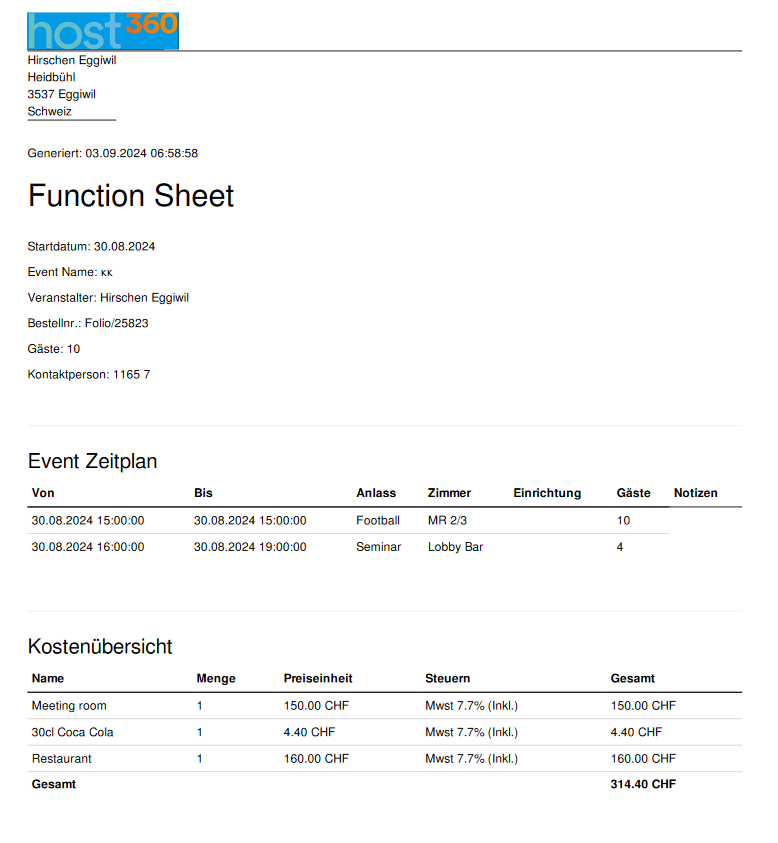
In a function sheet, the following information is available:
- Hotel info - hotel name, address, and contact information;
- Date and time of creation of the function sheet;
- Event info - start date, event name, event reservation number, number of guests, contact person, and contact details - phone and/or email;
- Event Schedule - all events with the specified start and end time, occasions, event rooms, and sections, number of guests, and notes;
- Cost Overview - all expenses for this event will be reflected in this section with corresponding prices - event room rental, bar/restaurant expenses, event equipment (microphones, projector, flipchart, etc.), some additional services.
There are no comments for now.
to be the first to leave a comment.